Proxy detection helps businesses identify whether a connection is associated with a proxy, VPN, or Tor. With SEON, this can be done through IP intelligence (via the IP API) and, for harder-to-detect cases like residential proxies, through device fingerprinting based on network and browser signals.
Want to get a glimpse of what SEON can tell from an IP? Click in the field below to test our proxy and VPN detection tool:
By using this tool, you agree to our Privacy Policy and General Terms of Service. We do not collect or store user-submitted IPs. This demo uses a predefined public IP address for illustrative purposes only.

What Is Proxy Detection?
Proxy detection is the process of identifying whether a user’s connection is being routed through a proxy, VPN, or similar anonymization technology. It is beneficial for catching harmful agents who spoof their connection details in order to commit fraudulent activities.
Proxies aren’t only used by fraudsters. Privacy enthusiasts rely on them to connect to the web. Plus, proxies can increase network speed by saving bandwidth or compressing traffic.
Web developers and marketers regularly rely on proxies to view online content from different geolocations. They are also a popular cybersecurity tool to filter out malicious websites or block malware and spyware. Still, proxy detection and VPN detection online is vital for fraud prevention and cybersecurity.
Why Proxy Detection is Important For Your Business
Understanding how users connect to your website helps you assess risk and intent. Proxies can signal that someone is trying to mask their connection details. That may be legitimate (for privacy or to access geo-restricted content), but it can also be used to bypass controls or hide suspicious activity.
In that sense, proxy detection helps you answer questions like:
- Is the user actually connecting from the location they claim?
- Are they trying to access a service they shouldn’t be able to reach?
- Are they using anonymization tools (proxy, VPN, Tor) to obscure their IP address?
- Does this connection, combined with other signals, indicate higher fraud risk?
That last point is key: proxy detection works best when combined with other methods such as risk scoring, identity verification, and behavioral analysis. Together, these signals help reduce fraud and abuse, support compliance, and lower operational costs without blocking legitimate users unnecessarily.
Use Cases for Proxy Detection and Fraud Prevention
Proxy usage doesn’t always point to fraud. But if it does, it’s because of the following types of attacks:
- Multi-accounting and bonus abuse: a fraudster creates multiple accounts using different email addresses and phone numbers. They also need proxies to generate a new IP address for each account.
- Payment and chargeback fraud: the criminal has access to stolen credit card numbers. They still need to be able to hide their traces, or select an IP address that matches the card’s issuing country.
- Identity fraud: the fraudster wants to create a new account with a digital bank. They have access to stolen IDs from the region, and need to use a VPN to find a local IP address. If they are successful, this could lead to all kinds of exploits, from loan fraud to money laundering.
There is also the issue of account takeover, where a fraudster will log onto one of your customer’s accounts. The most sophisticated fraudsters will attempt to recreate the legitimate account holder’s behavior, which could be done by finding an IP address that doesn’t arouse suspicions.
How Do Fraudsters Use Proxies?
Proxies can mask or spoof connection details, which makes them useful for fraudsters trying to hide where they’re really connecting from. VPNs and proxies work differently, but both can be used to obscure a user’s true IP and location. Here’s a simple example:
- A fraudster is based in Portugal.
- They have stolen Australian credit card details.
- They try to place an online order, and the transaction gets flagged.
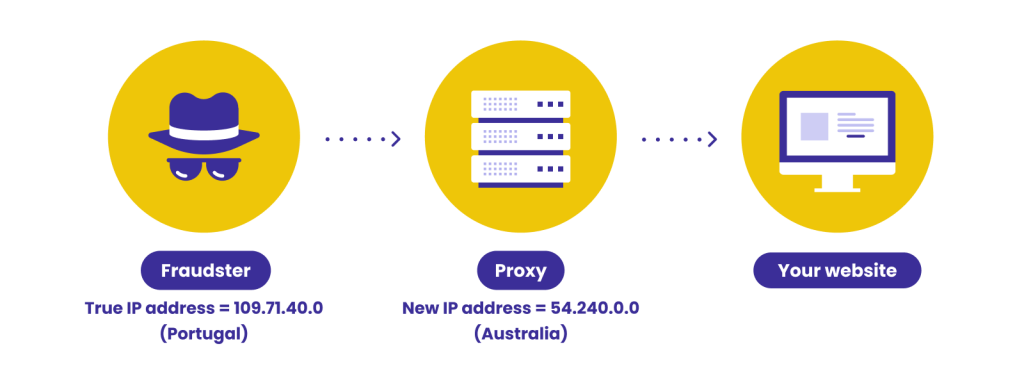
This is where a proxy or VPN can help them. By routing traffic through an Australian IP, the fraudster attempts to look “local” and retry transactions without triggering location-based controls.
The same logic applies to bot attacks and multi-accounting. To keep accessing a site at scale, fraudsters often rotate IPs to appear like different users, and sometimes pair that with device spoofing and disposable identities.
So what types of proxies do fraudsters use, and how do they differ? Let’s take a look.
Learn how APIs work, their benefits, and how they compare to manual data
Find out More
5 Types of Proxies Used by Fraudsters
Fraudsters take control of how your site sees their IP addresses using the following tools.
1. Datacenter Proxies
A data center proxy gives fraudsters an IP address belonging to a data center company. For instance, AWS (Amazon Web Services) has a range of IP addresses. Anyone who connects via an AWS data center will be assigned an IP in that range.
If you know the IP address ranges of data centers it becomes very easy to detect these kinds of proxies. Datacenter proxies act more like a “wall” that hides the original IP address but still points to a certain company.
In that sense, data center proxies are less valuable for fraudsters than residential proxies.
2. Residential Proxies
A residential proxy uses IPs provided by an Internet Service Provider (ISP). Each residential proxy has a physical location that can be selected manually or at random.
Residential proxies are harder to detect than data centers and tend to be more trusted. They are used by legitimate humans and belong to well-known ISPs, such as Comcast or AT&T.
This makes them highly in demand and, therefore, not cheap to acquire. Fraudsters either have to pay a premium or find illegitimate ways to acquire these IP addresses (through malware or a botnet, for instance).
However, recent years have seen a rise in the number of services offering residential proxies online. There are also financial incentives for people to resell their residential IPs, which complicates detection even further.
You can learn more about residential proxy detection here.
3. Mobile Proxies
Mobile proxies also assign IP addresses – specifically, IP addresses that belong to mobile data network carriers.
A notable difference is that network carriers do not assign just one IP per device, often rotating or cycling through several IPs depending on availability.
This means that when the network’s load is high, several different users and devices will have the same IP, making it easier for fraudsters to hide.
Do keep in mind that mobile proxies simulate mobile devices; they do not need to be used on mobile phones or tablets necessarily. From there, fraudsters can use proxy software providers or even SIM card farms to rotate between various IP addresses.
4. Virtual Private Networks (VPNs)
While a virtual private network isn’t technically a proxy, it does serve the same purpose. The main difference is that a proxy redirects all of your device’s traffic, while a VPN works on an application level.
However, just like with proxies, the IP is hidden and traffic is rerouted through remote servers instead of their official ISP. VPNs can also be residential or from data centers.
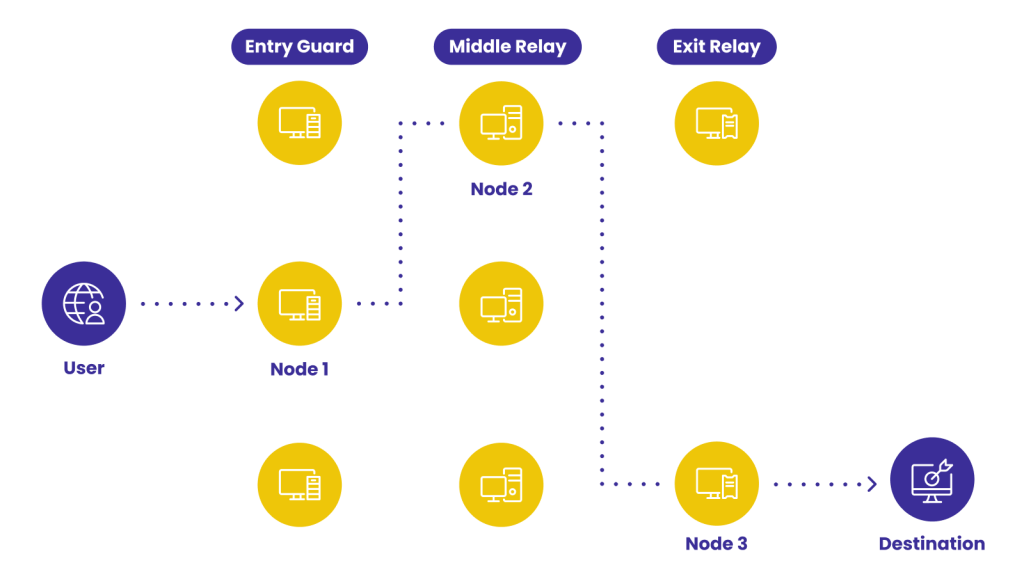
5. Tor Network
Not technically a proxy, but Tor, or The Onion Router, also hides fraudsters’ IP addresses. However, because the exit nodes are public, they are fairly easy to detect.
Detecting Tor IPs is easy, but you shouldn’t assume that you’re dealing with a fraudster based on that information alone.
It’s better to calculate an IP fraud score to determine whether you should block the action or not and combine this with other information.
11 Proxy Detection Techniques
As we’ve seen above, some proxies are more valued by fraudsters than others. A lot of it has to do with how easily they can be detected.
Here are the detection methods at your disposal.
Ping Test
A ping test is a method to measure the minimum time to send the smallest possible amount of data.
However, ping tests do not return results with proxies. If a ping test does not return results, it could be a strong indicator that you’re dealing with a proxy.
Latency Measurements
A logical way to establish that a user relies on some kind of tunneling protocol is to create a latency test.
In theory, if their connection appears slower than expected, they are probably using a proxy. This can be done by measuring two latencies and comparing them:
- latency from browser to web server: measured using JavaScript from the browser
- latency from an external IP to a web server: measured using a TCP/IP handshake
The geographical delay that has originated from the proxy is a clear indicator that you’re not dealing with a direct connection.
WebRTC Test
WebRTC enables direct peer-to-peer communication between users (for instance, voice or video chats). However, the protocol does not always go through proxies, even if you have one in place.
In Google Chrome, for instance, WebRTC will still use your original IP address. Researchers also found that 19 out of 100 VPNs accidentally leak the original IP addresses via WebRTC.
This is a goldmine for proxy detection. Using a simple HTML code, you can display the original IP address as seen by WebRTC.
TCP/IP Fingerprint Test
An interesting technique that works both for proxy detection and device fingerprinting. The idea is to compare the operating system advertised by the browser’s User-Agent and the one you get using a TCP/IP check.
If the results aren’t consistent, you may get two strong signals: that the user is spoofing the user agent, and that they’re probably connecting via some kind of proxy.
Open Port Scan
Proxies tend to leave open ports. If you know which port that tends to be, you can infer that you’re dealing with a certain proxy.
For instance, some providers resell hacked SSH connections where port 22 is always open. Other well-known proxy open ports, such as 3128 or 1080, can also indicate you’re on the right track.
Datacenter IP Test
Sometimes, the simplest way to check if you’re dealing with a proxy is to ask politely. And this asking is really about checking whether the IP falls within an officially published range.
Companies such as AWS or Digitalocean do publish their IP ranges, which is probably the easiest way to know if you’re dealing with a connection originating from their data centers.
Needless to say, checking every IP manually is time-consuming, which is where an API will come in handy.
DNS Leak Test
A DNS leak is considered a serious privacy and security flaw. Put simply, it allows an ISP to log and track every single website and app you use.
But in the context of proxy detection, there is a silver lining. It means you can check whether the IP really belongs to the corresponding ISP.
In other words, if the DNS leak points to a UK ISP but the official IP points to Serbia, you can confidently infer that you’re dealing with a proxy connection.
HTTP Proxy Headers Test
Every header HTTP request can contain valuable information about a connection. In our proxy hunting case, in particular, that information comes in the form of additional requests made by the proxy.
By measuring the number of HTTP header requests, you can look for suspicious patterns that may point to proxy use.
Blacklists Check
Blacklists, or blocklists, aren’t always the most reliable methods to identify proxies (in the iGaming world, for instance, it is a well-known secret that some vendors were using shared blacklists to block competitors from accepting their most valuable players).
Still, it’s a simple enough line of defense, provided you manage to identify bad proxy IPs in the first place.
Timezone Test (Browser vs. Timezone)
This is yet another interesting technique that overlaps with what we call device fingerprinting.
By comparing the IP timezone against the browser timezone, you can identify mismatches that may point to proxy usage.
Browser-Based Port Scanning
Browser-based port scanning is a somewhat controversial method, but it has one key advantage: being able to detect Tor usage.
We know, for instance, that Tor always uses ports 9050 and 9150, so browser scanning can let us know when you’re dealing with a privacy enthusiast (or a potential fraudster).
How SEON Does Proxy & VPN Detection via API
In practice, SEON’s IP API is useful for identifying known VPNs and datacenter or web proxies based on IP intelligence, while device fingerprinting helps detect harder-to-spot cases like residential and mobile proxies using network and browser signals.
The key is that SEON gives you an idea of whether you are likely to deal with a fraudster or not. That likeness is gauged using a fraud score or risk score.
This is how it will look from your end.
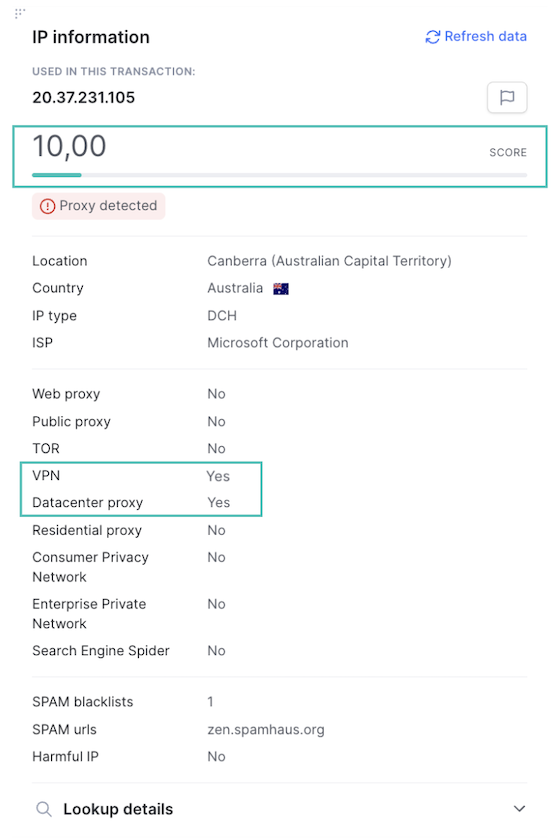
As you can see in this test, we detected that this particular IP pointed to a VPN and a data center. The fraud score is fairly low because there are many more factors to take into account (note that SEON’s fraud scoring is fully customizable, so it can be tweaked to suit your risk appetite).
Here is the same event, where you can see a combination of risk rules relating to the IP and email address:
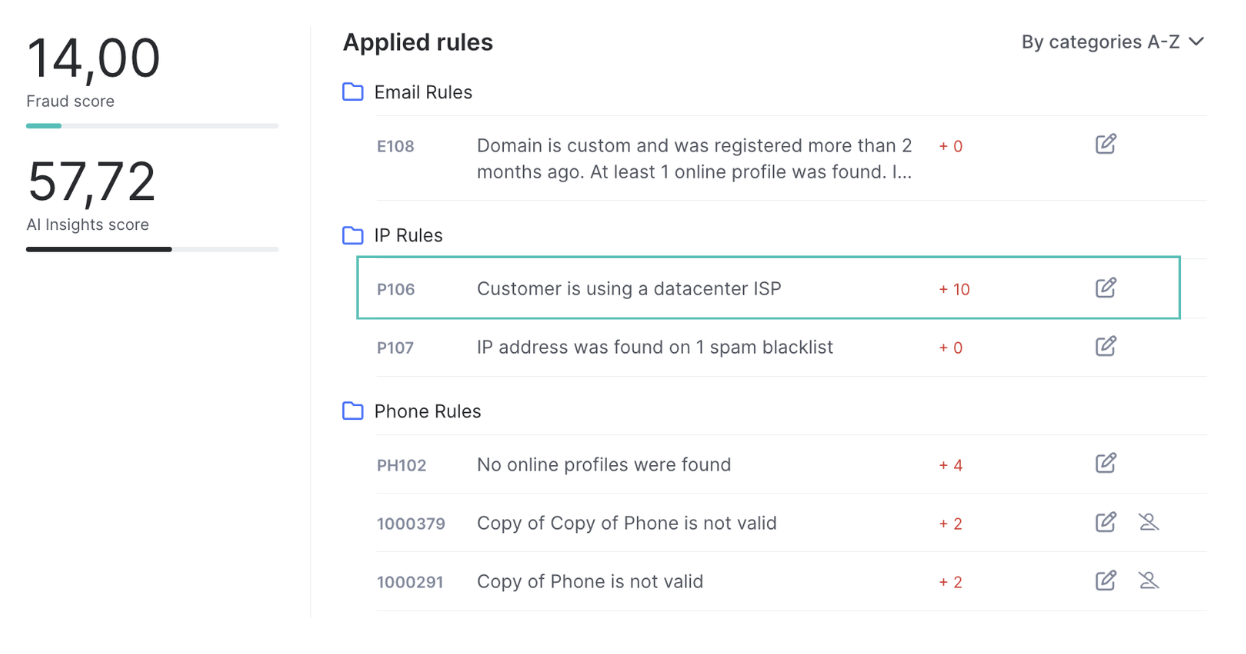
You can get the results via API calls, but also using a simple manual check or even a Google Chrome extension.
The results are nearly instantaneous, no matter how many IPs pass through your website on a daily basis.
SEON Fraud APIs are highly configurable to match your unique business needs
Speak with an expert
Hackers can use a variety of techniques to bypass proxy detection, from built-in browser tools to paid residential proxies and VPNs.
Proxy detection can be extremely accurate if you rely on more than one detection technique at once. Because proxies always modify the connection details in one way or another, a webRTC test or latency test can reveal when a proxy is in use.
Yes, proxy detection is possible based on a variety of techniques, such as webRTC tests or open port pings. The idea is to look for suspicious delays in data delivery compared with a standard connection.
Sources
- Incolumitas.com: Detecting Proxies and VPNs With Latency Measurements
- webrtcH4cKS: So your VPN is leaking because of Chrome’s WebRTC…
- Nem.ec: eBay is port scanning visitors to their website – and they aren’t the only ones