Reverse email lookup uses that email address to surface the public, technical and digital-footprint signals connected to it, so you can assess who is likely behind it. It can point to linked social profiles, domain and breach details and account history, but it does not prove identity on its own. Where those signals are thin or missing, the absence itself is often the most telling result.
Enter an email to test our reverse email lookup tool:
By using this tool, you agree to our Privacy Policy and General Terms of Service. This demo uses predefined example values for illustrative purposes only. No personal data is collected or stored.

What Is a Reverse Email Lookup?
Reverse email lookup is a process or service that allows you to find information about a person or entity using their email address as the starting point. As an investigative tool, reverse email lookup scans numerous sources, such as social networks, public records and databases, to gather comprehensive data linked to an email ID.
Typically, when you input an email address into a reverse email lookup service, the system searches through available data points to provide relevant personal and professional details. Often, this includes contact information, social media activity, professional history, and sometimes even sensitive data like legal records or security threats associated with an email address.
Reverse email lookup enables digital footprint analysis, where you attain additional information based on a limited number of data points. When combined with other digital signals, such as a reverse phone lookup or Bank Identification Number (BIN) lookup, this approach can create a more complete profile of an individual, enhancing your understanding of their online behavior and potential risk factors.
How Do I Perform a Reverse Email Lookup?
Most lookup tools work the same way at the basic level: you enter the email address, run the search, and any publicly available information linked to that address appears on screen. Some providers also return a downloadable report.
For repeat or higher-volume use, there are faster routes. Application programming interface (API) calls let you run lookups automatically inside your own systems, browser extensions bring the check into your workflow, and bulk upload by spreadsheet lets you screen many addresses at once and export the results.
What Information Can You Find with a Reverse Email Lookup?
What a reverse email lookup returns depends on the privacy settings of the address owner, the sources the tool can reach and what the law allows it to access. Public presence on a platform can usually be detected; the private content of an account, such as a person’s posts or the name on their profile, generally cannot. With that boundary in mind, a lookup commonly surfaces:
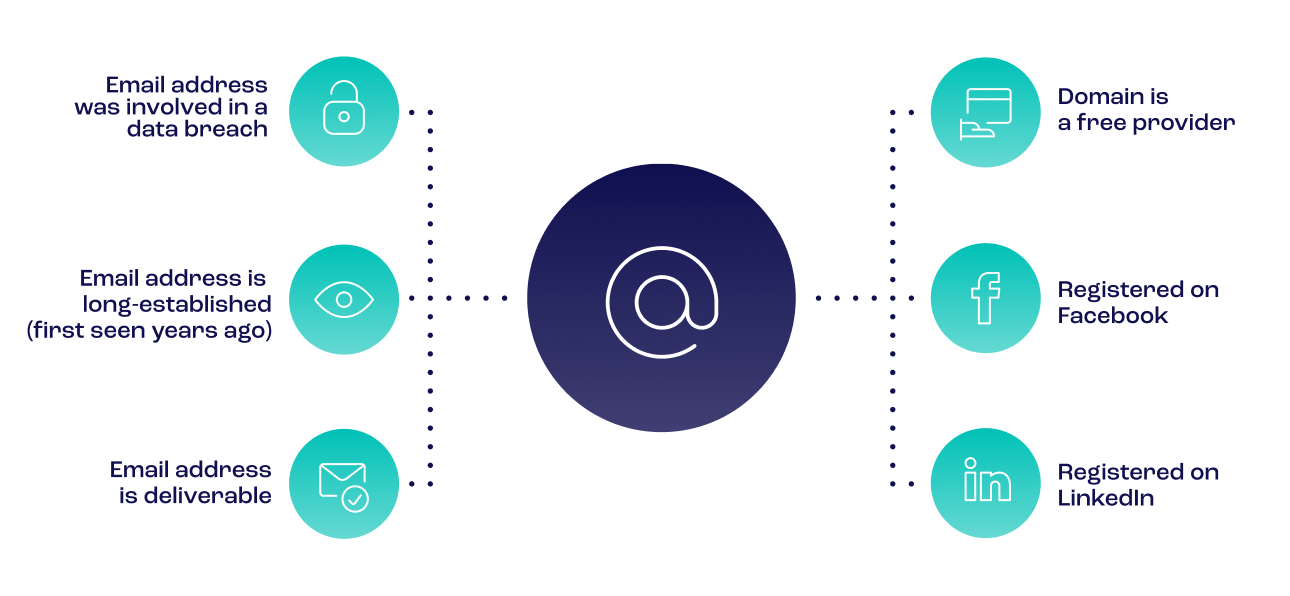
- Email validity and type – whether the address is deliverable, and whether it is a free, custom or disposable domain
- Approximate age – often estimated from the earliest data breach an address appears in, as a proxy for how long it has existed
- Digital footprint – the web and social accounts registered to the address, categorized across personal, social media, e-commerce, subscription and business services
- Data-breach exposure – which known breaches the address has appeared in, if any
- Provider and domain details – the email service, domain type and registration information
- Fraud history – whether the address has been seen before in fraud-screening networks and linked to high-risk activity
A lookup does not reliably return a person’s legal records, relatives or confirmed employment history, and it cannot verify that the current user is the true owner of the address. Treat the output as risk context to weigh alongside other checks, not as a standalone identity confirmation.
What Does an Email’s Digital Footprint Actually Tell You?
A footprint is read, not counted. What matters is not how many accounts an address links to but the story they tell about whether a real person stands behind it.
“A genuine email is one someone lives in, picking up a streaming account, a retail login and a professional profile over the years. When an address turns up with none of that and was clearly created moments before sign-up, that emptiness is the signal.”
Matyas Varga, Head of Global Fraud Services, SEON
An address created moments before sign-up, with none of that history, is the inverse of a real identity, which is why that emptiness reads as a signal in itself. The pattern holds at scale: SEON’s data shows that 76% of online lending users with no detectable social media presence ultimately defaulted on their loans.
It still takes judgment. A thin presence on a customer in a region with lower digital adoption may be perfectly normal, so the signal only becomes reliable when it is weighed against the phone, device and IP data around it.
Can You Track Anonymous Emails with Reverse Email Lookups?
A reverse email lookup may surface signals associated with an anonymous address, but it cannot confirm who currently owns or controls it. Anonymous emails are often created to mask identity, yet they still tend to leave traces wherever they have been used to register for a service, which can reveal linked aliases, a profile image or a general location.
Disposable and temporary addresses yield the least, by design. Many are created only to clear a one-time password (OTP) step and are then abandoned, so they carry almost no history. A good lookup detects the disposable domain itself, which is frequently more useful than the sparse data behind it, and treats that as a risk signal to assess alongside other checks.
How Does a Reverse Email Lookup Work?
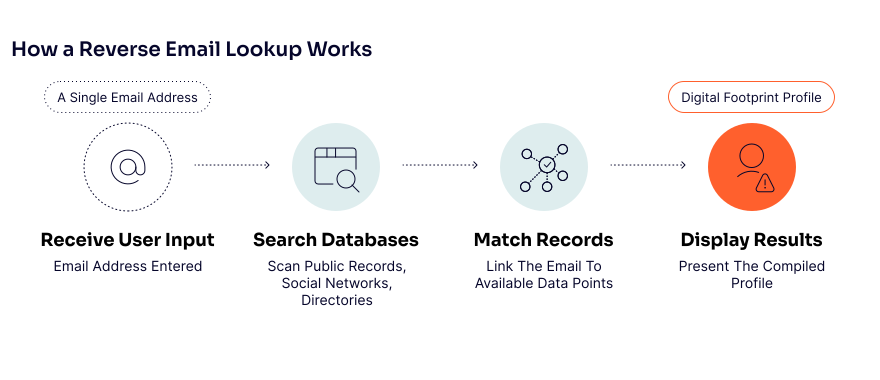
A reverse email lookup works by receiving an email address from its user and then searching publicly available records, such as online directories, to find social media accounts by email, for any and all instances where that email address appears.
The resultant data is then presented to the user so they can – if this process is successful – obtain a profile of the email address owner. Shown as a step-by-step list, the process can be summarized as follows:
- Receive user input: The lookup tool receives the email address from the user.
- Search databases: The tool scans publicly available records.
- Match records: It identifies any matches between the email address and the publicly available information.
- Display results: The tool displays the matched records to the user.
This process is facilitated by sophisticated algorithms that scan and analyze vast amounts of data quickly and efficiently. Integrating multiple data sources enhances the accuracy and completeness of the results, making reverse email lookup a powerful tool for digital verification and personal or professional investigation. By utilizing this technology, users can uncover a comprehensive digital footprint of an email address owner, providing valuable insights into their identity and activities.
How Can a Reverse Email Lookup Help You?
A reverse email lookup helps you decide how much to trust a contact before you commit to them. For a business, that supports safer onboarding, quicker risk decisions and fewer bad accounts slipping through, because you learn something about a user at the exact moment they first reach you.
In practice the value shows up in three ways. It adds a fast credibility check whenever your organization meets a new sender or account holder, so an extra layer of assessment applies by default. It helps you judge whether an address is a real, established email or a throwaway created to get past a form, which sharpens your view of a contact’s risk. And it gives you a defensible signal to act on, whether that means approving a user, asking for more, or declining.
Put together, reverse email lookup helps you move faster on the users who are clearly genuine and concentrate your attention on the ones who are not.
See how SEON’s reverse email lookup helps you spot fake users, assess risk, and speed up verification—guided by our fraud experts.
Speak with an expertKey Trends for Reverse Email Searches in 2026
In 2026, reverse email lookup continues to evolve alongside shifts in digital risk and privacy. With email-based fraud growing more sophisticated, lookup tools now rely more heavily on AI and behavioral analysis to detect subtle signs of fake, temporary or synthetic accounts.
At the same time, privacy regulations like GDPR and CCPA have driven greater demand for lookup solutions that use compliant, publicly available data. These tools focus on transparency and trust, enabling safer identity assessments without overstepping user rights.
Another key trend is the move toward real-time, API-driven integration. Businesses increasingly embed email lookup into fraud detection stacks and onboarding flows, turning static checks into dynamic risk signals. Email intelligence is now a core part of automated decisioning in high-volume environments.
How To Choose a Reverse Email Lookup Tool
The right tool depends on why you are running the check, so define that first and let it drive the rest.
- Purpose – risk management, customer profiling or lead enrichment each point to different features.
- Frequency – occasional lookups, bulk searches or continuous monitoring should match the pricing model you pick.
- Depth of insight – decide whether you need basic details or advanced data such as social profiles, risk indicators and full digital footprints.
- Data compliance – confirm the tool adheres to GDPR, CCPA and other data-protection laws to avoid legal exposure.
- Speed – instant results matter for real-time risk decisions, while slower, detailed reports suit investigative use.
- Enrichment breadth – if you also need reverse phone lookup, IP analysis or device intelligence, choose a tool with versatile, connected data sources.
The strongest tools meet these criteria while keeping their data reliable, compliant and genuinely actionable.
Using Reverse Email Lookup for Fraud Prevention
At its most useful, reverse email lookup is a real-time credibility check rather than a background report. Enriching an address the moment it is entered, against live social, web and provider sources rather than a stored database, lets a business judge a user from a single data point they have already handed over, before any payment or document check.
Applied consistently at scale, the same check becomes a screening layer. Running email alongside phone, IP and device signals in one workflow surfaces disposable or synthetic addresses, mismatched identities and low-trust patterns early, which matters most in high-risk sectors such as fintech, iGaming and e-commerce during onboarding, login and payments.
Delivered by API, a lookup drops into existing flows and feeds dynamic risk scoring without slowing legitimate users down. Used this way, it supports automated decisions, cleaner segmentation and stronger protection against account takeover, bonus abuse and identity fraud, all from a signal collected at sign-up.
Sun Finance cuts fake applications and boosts credit scoring with SEON’s email analysis. See how they verify users and stop fraud fast.
Read case studyFrequently Asked Questions
Are reverse email lookups GDPR-compliant?
While the act of legitimately carrying out a reverse email lookup is legal, whether the search itself will involve sifting through GDPR-compliant data depends on whether the target email address is connected to GDPR-compliant public records. Plus, some email lookup tools follow different jurisdictions and terms and conditions, so your best course would be to check the terms of use for each lookup tool you use.
How to trace an email address to its owner
Use search tools that are designed to reveal the email address owner’s IP address, such as SEON’s email lookup. Also, scrutinize the email address’s domain type because this could reflect where the person lives and where they work. Plus, by entering the email address in a search engine, you may find that it’s already attached to online databases, such as those hosted by LinkedIn and Meta.
Is it free to do a reverse email lookup?
It is certainly free to do a single reverse email lookup given that you can easily find free ones online. That said, the more you look for software that offers a high quantity – and quality – of reverse email lookup checks, the more likely it is that you’ll start being charged for the convenience.
Where does the information come from? How is this data sourced?
Most email lookup tools enrich data from open-source databases, such as those related to social media accounts and phone number directories. SEON’s lookup, for example, aggregates device, IP, and social media information.
What does an email’s domain type actually tell me?
It can provide information about the nature of the email and the location that it came from, and possibly the level of legitimacy or suspicion that applies to it. For example, “@wh!tehouse.g0v” is far more likely to have been sent from a high-risk sender than one sent from “@whitehouse.gov”.