TLDR:
- Your AI tool can query your fraud data — but it doesn’t know your role, thresholds or what normal looks like in your environment
- Every major AI tool has a settings area where you save persistent context about yourself; fill it in once and every future conversation starts calibrated to your operation
- Two things go into that settings field: who you are (your role, tools, process) and what normal looks like (your baselines)
- The whole setup takes 15 minutes
Your first few AI queries probably felt flat. You asked something like “show me declined transactions from the last seven days,” and you got back an accurate but generic list. The AI treated you like any fraud analyst at any company, because as far as it knew, that’s exactly what you were. Ask “anything unusual overnight?” and it stalls — which action types, what counts as unusual, what’s your time zone? The data connection is working, and AI can detect your fraud signals. What it cannot see is you: team structure, KPIs, your definition of an uneventful morning. Without context, AI is a search engine pointed at your data. With it, it’s a colleague who already sat through your onboarding. That’s the gap persistent context closes, and it closes one before your next query.
What Persistent Context Does
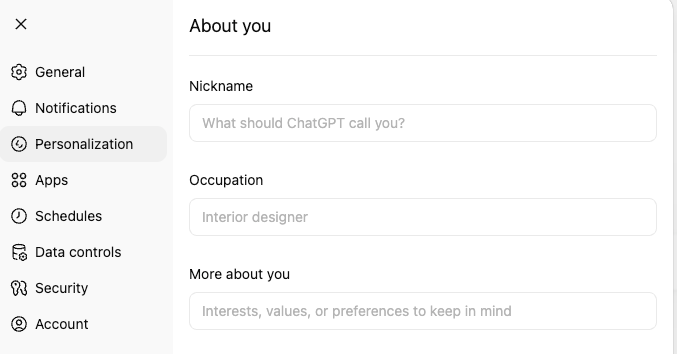
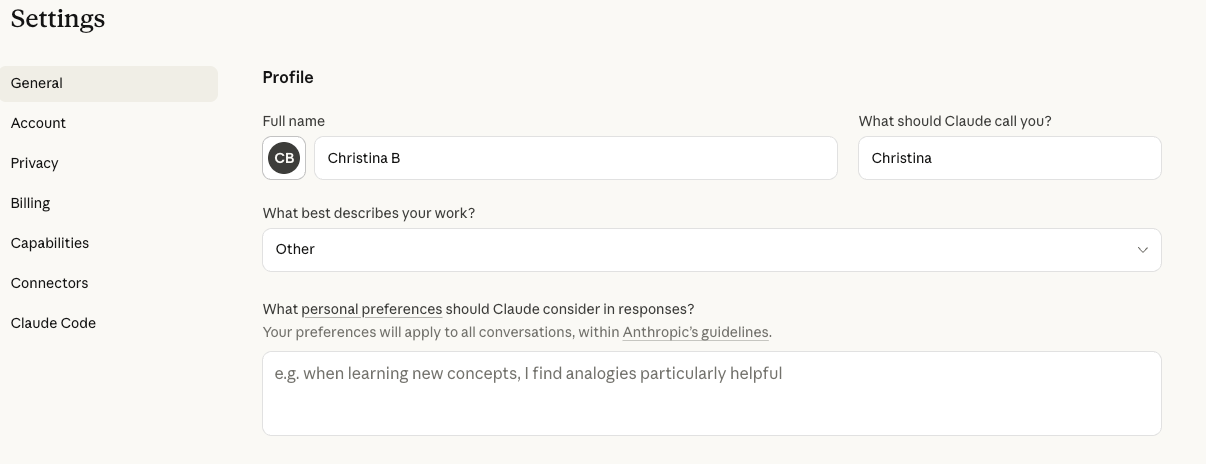
Most AI tools have a settings area where you can save information about yourself that automatically carries over to every conversation. Claude calls it a Profile. ChatGPT calls it Personalization. Gemini uses Gem setup prompts.
Whatever the tool calls it, the function is the same: you write your operational context once, and AI references it automatically in every future session. Instead of re-explaining your thresholds and your action types each time, AI already knows. Your queries return sharper answers on the first try because AI has a foundation to work from.
Two types of context go into this settings field. The first is who you are, what your role is, responsibilities, tools and process. The second is what normal looks like: volume baselines, seasonal patterns, risk model thresholds. Both matter equally and need to go to the same place.
Where To Find It
| AI Tool | Where to Save Your Context |
| Claude | Settings → General → Profile |
| ChatGPT | Settings → Personalization → About you |
| Gemini | Gem setup prompt |
ChatGPT
Claude
For detailed navigation in each tool, refer to its respective documentation. The steps are straightforward in all three.
Part 1: Who you are
Copy this template into your AI tool’s settings and fill in the brackets. It’s built from how fraud and AML analysts actually describe their work. Spend 10 minutes here. The “How I work” and “Communication style” sections are defaults you can use as-is, and after your first week of real queries, you’ll have a clear sense of what to refine and what’s already working.
About Me
Role and scope
- [Your title and company, e.g., Senior Fraud Analyst at [Company], BNPL/fintech/payments/lending/betting & gaming]
- [What you’re responsible for, e.g., rule writing and optimization, manual review, fraud strategy, AML monitoring]
- [How long you’ve been in this role or in fraud/risk work generally]
- [Team size and structure, e.g., I’m a team of one” or “part of a 5-person fraud ops team with a data science counterpart]
What I work on day to day
- [Primary fraud types, e.g., application fraud, ATO, first-party abuse, payment fraud, muling]
- [Decision model, e.g., binary approve/decline in real-time or review queue with tiered scoring or a mix depending on flow]
- [Approximate volume, e.g., ~2M transactions/month or ~500 manual reviews/week]
- [Key KPIs you monitor, e.g., decline rates, false positive rate, FPD, DPD 30, approval rate impact, blocked GMV]
Tools and environment
- [Fraud tools, e.g., SEON for fraud prevention, identity verification and AML compliance]
- [Analytics tools, e.g., BigQuery + Looker for cohort analysis or Excel/Google Sheets, or I don’t have direct SQL access]
- [AI tools you already use, e.g., Cursor to create bespoke dashboards or none yet]
- [Technical comfort level, e.g., I write SQL daily or I can read rule logic but don’t code or non-technical]
How I make rule decisions
- [Your process, e.g., I test rules live at score 0 and watch the first flagged transactions, or I run historical simulations before deploying]
- [Biggest bottleneck, e.g., deciding what should go into the rule, not writing it or getting clean data to validate a hypothesis]
- [What you wish you had help with, e.g., proactive trend surfacing, rule impact estimation, faster pattern recognition on new MOs]
How I work
- I value direct, objective, critical thinking
- Break complex problems into clear steps with reasoning
- Offer multiple perspectives or solutions where relevant
- Give me actionable analysis, not vague suggestions
- Ask clarifying questions when something is ambiguous rather than assuming
Communication style
- Be concise but thorough; say what needs to be said, nothing more
- Don’t pad responses with filler or unnecessary caveats
- Challenge my thinking when you see gaps; I want a thinking partner, not a yes-machine
Part 2: What normal looks like
The template above tells AI who you are. This section tells it what your environment looks like on a regular day. You already carry this context in your head. AI doesn’t have it until you write it down, and without it, every Friday looks like an anomaly.
Add the following to the same settings field, below your About Me. If you run out of space, open a conversation and ask the AI tool to save it to its system memory directly. Fill in the values you know off the top of your head. You don’t need exact numbers. Approximate ranges are enough for AI to distinguish a routine fluctuation from a genuine anomaly.
Volume baselines. “We process about [X] transactions daily. Our decline rate sits between [X-Y]% depending on the day of the week. Our review queue typically peaks at [X-Y] decisions in the morning window.”
When AI knows your normal volume, a spike to 200 queued decisions reads as an operational signal rather than just a busy day.
Seasonal patterns. “We see a [X]% volume lift on Fridays and a [X]% spike on the 1st and 15th of the month due to payroll. December has elevated chargeback rates that don’t apply to other months.”
Most fraud teams see day-of-week variance and month-end spikes. If you don’t explicitly tell AI about those patterns, it flags variance that your experienced analysts recognize immediately as expected.
Customer base characteristics. “We serve [describe your user population, and what’s normal for that population that might otherwise look suspicious, e.g., ‘Our users are mostly under-25, so new Gmail addresses and email accounts under six months old are expected, not suspicious.’].”
One analyst told their AI: “We serve college students, so shared dorm IP ranges are normal.” The AI stopped wasting time on false positives and focused on genuine outliers.
Risk model context. “Our scoring model flags anything over [X] for review and auto-declines above [X]. Scores between [X-Y] mean ‘worth a second look.’ Scores above [X] mean ‘likely decline.’ Analysts have approximately [X] minutes per review decision.”
AI needs this to prioritize what it surfaces. Without it, every high score looks equally urgent.
Environmental quirks. “[Describe anything that regularly fires fraud signals but is expected in your environment, e.g., ‘Corporate VPN IP ranges from [company] fire datacenter_ip checks on every transaction. This is expected, not suspicious.’ or ‘Device fingerprinting behaves differently on our web vs. mobile flows.’].”
These aren’t rule changes. Their interpretation context that helps AI read signals the way your experienced analysts do.
Recent changes. “We deployed [rule/change] [X] weeks ago, and it’s catching some legitimate cases. [Any new customer segments, fraud campaigns, or operational changes].”
Fresh context prevents stale analysis. If you added a rule last week that’s producing false positives, AI needs to know that before it attributes a decline spike to a new attack pattern.
Refine over time
Neither section needs to be perfect on day one. Fill them out, run a few real queries and notice where AI still asks questions it shouldn’t need to ask. Those questions point directly to the gaps in your profile.
After a week of daily use, you’ll have added a few lines you didn’t think of initially. After a month, your persistent context will capture operational knowledge you didn’t realize you were carrying. Your AI tool now knows who you are and what normal looks like. Every conversation from here starts from that foundation.
Frequently Asked Questions
In Claude, go to Settings → General → Profile and paste your operational context (role, tools, baselines, working preferences) into the text field. If you’re using a Claude Project for fraud work, you can also add this context as Project instructions, which gives you the additional ability to upload reference files and attach skills. Both approaches automatically carry your context into every conversation.
Include your role and responsibilities, the fraud types you monitor, your decision model (binary vs. queue-based), your approximate transaction volumes, the tools you use, your scoring thresholds and your volume baselines. The more specific you are about what normal looks like in your environment, the less time you spend correcting AI’s assumptions mid-conversation.
Add your scoring thresholds to your AI tool’s persistent context settings in Profile in Claude or ask it to save it to its system memory file, Custom Instructions in ChatGPT, Gem setup prompt in Gemini. Include which score ranges drive approve, review and decline decisions, and what each range means operationally. AI will reference these thresholds automatically in future conversations.
Update it when something meaningful changes: a new rule deployment, a new customer segment, a shift in your baseline volumes or a change to your scoring model. For most fraud operations, that means a minor update every few weeks. You don’t need to maintain it like documentation. Just add context when you notice AI making assumptions that don’t match your current environment. You can always ask AI to help update it for you.